
Today, all ERDAS TITAN Clients participating on the public TITAN Network will automatically update to version 9.3.2d. This update includes fixes for:
* KML optimization that accelerates rendering of vectors with many features or vertices
* Fix for KML shadowing properties
The auto-update will occur the next time you log into the public ERDAS TITAN Network with your TITAN Client.
Thursday, December 18, 2008
ERDAS TITAN Client Update: includes faster vector rendering!


Tuesday, December 16, 2008
OpenStreetMap and ERDAS TITAN for Broad Global Basemap Coverage
I'm buzzing a lot about incorporating OpenStreetMap (OSM) as the default basemap in the TITAN Viewer because we are especially excited to have the opportunity to make available to TITAN users this unique, free source of data contributed to by "community cartographers" around the globe.
The blogosphere is rich these days with comparisons hailing the OSM global dataset as 'better than' that of other corporate competitors in many areas. SlashGeo points to some comparisons here. This is so interesting since contributions to OSM are made by a volunteer force; no corporate machine feeds this source!
In a November post Ogle Earth blog zooms in on Baghdad to show OSM having the best coverage and "going where big corporate mapping datasets fear to tread." In Baghdad all other maps but OSM are sparse at best, as illustrated in this post.
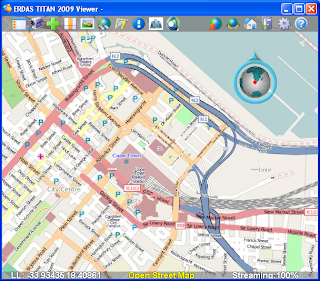
ERDAS TITAN 2009 Now Supports OpenStreetMap press release was issued today. Below is a screenshot of OSM in the TITAN Viewer.
Monday, December 15, 2008
Use Your Own Data as Basemaps and Terrain in the TITAN Viewer
Ryan at The Fiducial Mark has been busy hosting webinars such as "3D City Construction Workflows: From Collection to Presentation" and also making interesting posts showing how to make the most out of the ERDAS TITAN Viewer for modeling 3D urban spaces. In two separate posts he describes how you can use your own personal, local data as either 1. basemap or 2. terrain in the TITAN Viewer.
1. First is the post on Defining Your Own Raster Basemap in ERDAS TITAN:
Most virtual worlds have pre-cooked imagery that they serve up as their "skin of the earth" basemap. But what if I want to define my own default imagery, just for my own personal use?
Here Ryan walks easily step by step to show you how to turn your own datasets into basemaps in the TITAN Viewer. He added a picture displaying results:

2. Ryan deals in photogrammetry and highly accurate data. In another post he describes how terrain available in many virtual globes are too coarse and inaccurate to properly display 3D buildings extracted from photogrammetric processes. In a post on 3D Buildings and Terrain in Virtual Worlds Ryan points out that the latest release of ERDAS TITAN has a good technique for sorting out this problem by allowing you to specify your own local raster datasets as terrain layers:
In this case I processed my own digitial orthomosaic along with a terrain layer during the photogrammetric processing part of the project. I added the digital elevation models as layer, right-clicked on it and chose the "use as terrain" option....The result is that the (3D KML) buildings sit perfectly on top of the terrain.
Here's a screenshot of floating buildings:

And here's a screenshot in the TITAN Viewer with an accurate, locally added terrain source and the buildings sitting properly on the ground:

Thanks for the How-To along with the posts Ryan!
Thursday, December 4, 2008
ERDAS TITAN Client 9.3.2c Released!
We have made some exciting changes to the ERDAS TITAN Client! New features in ERDAS TITAN Client 9.3.2c include:
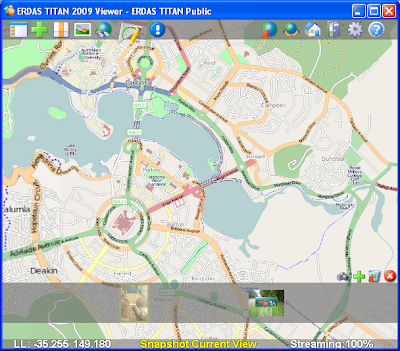
- OpenStreetMap is the default basemap. This collaborative, free global map project is now available as the default basemap option in the TITAN Viewer. For more information on OpenStreetMap, please visit http://www.openstreetmap.org/
- Multi-Screen Support allows you to span one TITAN Viewer display across multiple PCs/ screens, creating the illusion that the numerous displays are one contiguous display.

TITAN spans multiple screens at Arizona
State University's Decision Theater.
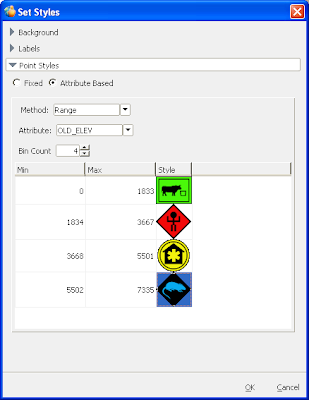
- Attribute based symbology for point vectors in the TITAN Viewer and a default DHS symbol set.
- Locally add multiple DEMs as terrain sources in the TITAN Viewer.
To see a list of all the enhancements, please see ERDAS TITAN Client Update 1 – Version 9.3.2c What’s New.
Friday, November 21, 2008
Basemap Improvements coming to ERDAS TITAN
In the next few days, we will be making some exciting changes to ERDAS TITAN.
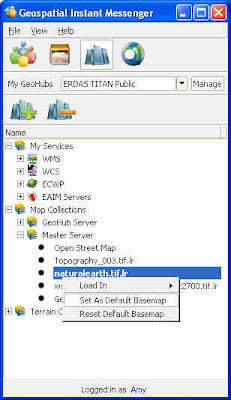
During this transition, you may need to change your default basemap in the TITAN Viewer. You can do this by following these simple instructions:
1. Select the Services tab in the Geospatial Instant Messenger (GeoIM)
2. Expand Map Collections/Master Server
3. Choose from three global coverages:
- Topography_003.tif.lr
- naturalearth.tif.lr
- world.topo.bathy.200407.3x5400x2700.tif.lr
4. Right click on a coverage and select ‘Set As Default Basemap”
5. Close and reopen your TITAN Viewer (reopen Viewer from GeoIM: File/Launch TITAN Viewer)
OpenStreetMap (OSM), a collaborative global map project, will be your default basemap in a TITAN Client auto-update next week.
Thank you for being a part of the ERDAS TITAN Community!
Thursday, November 20, 2008
Professors! Hassle-free data delivery to your students!
Paul at The Field Guide points out how useful TITAN would have been during his time at Georgia Tech.
Paul also points out that the ERDAS 2009 DVD Media Kits containing all ERDAS software and data examples for all ERDAS products are currently shipping!
Wednesday, November 12, 2008
TITAN goes Multi Screen!
This fall update to TITAN includes support for Multi Screens: spanning one TITAN Viewer display across multiple screens. In a multi-screen environment, many screens display the output of one computer and create the illusion that the numerous displays are one contiguous display. TITAN multi screen support will include both flat wall displays and also immersive environments.
Check out TITAN across 3 screens in ASU's Decision Theater:
"The ASU Decision Theater consists of an interactive 3D immersive environment
built with cutting edge graphics technologies. The core component, called the
Drum, is a 260-degree faceted screen that can display panoramic computer
graphics or 3D video content."
Look for Multi Screen support this fall as a feature in the free TITAN Client!
Subscribe to:
Posts (Atom)


 Posts
Posts

